Introducing TekGarage: Your Porsche's Specs, Service History and Diagnostics in One App
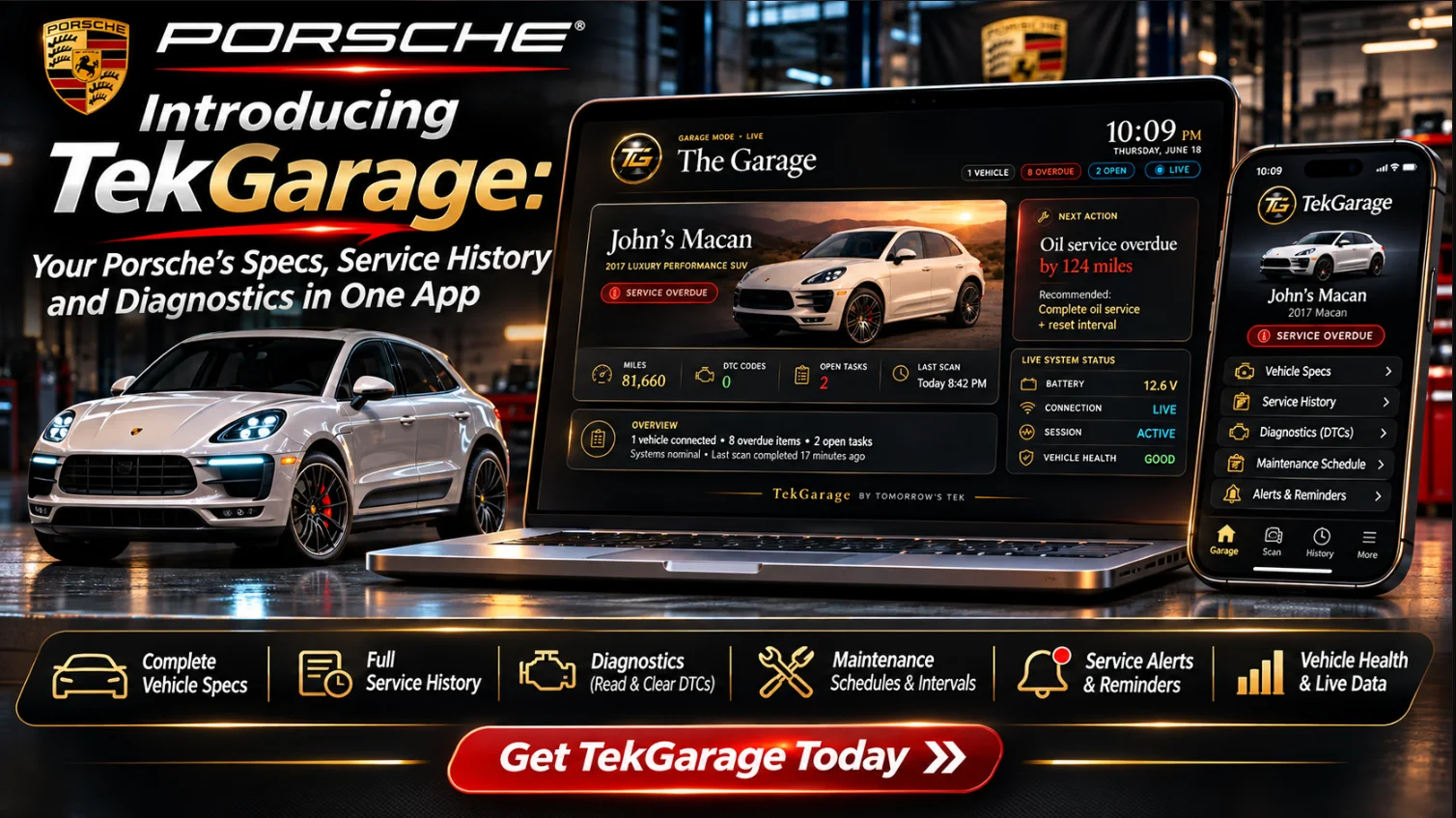
TekGarage is our Porsche-first garage app: add the car by VIN and it knows the engine, the parts, the maintenance plan and, with an OBD adapter, what the car is doing right now.
In this article
Most car apps are logbooks. You type in what you did, and they remind you when to do it again. That is useful, but it doesn't help much when you're standing at the parts counter wondering which oil filter your engine takes, or staring at a check engine light wondering whether to drive home.
TekGarage is the app we built because we wanted something that understands the specific Porsche in the driveway. You add the car by VIN, and from there it knows the engine, the parts and fluids that engine takes, the maintenance plan that goes with it, and the history of what's been done. Plug in an OBD adapter and it also shows what the car is doing right now.
This post covers what TekGarage does today, what's still in Beta, how the free and paid plans differ, and how to get started.
It starts with the VIN
The first step is adding your Porsche. Scan or type the VIN, and TekGarage decodes the engine automatically, builds a vehicle profile and sets up the maintenance plan for that car.
That matters on Porsches more than on most brands. The same model name can cover very different engines across generations and trims, and the right filter, fluid or service interval depends on which one you actually have. Getting the engine right up front is what makes everything else in the app trustworthy.
Once the car is in, you get:
- Exact OE parts, filters and fluids for your engine, with correct quantities, ready to order in a tap
- Tires, wheels and fluids at a glance: factory tire sizes, bolt pattern, lug torque, oil capacity, and the filters and fluids your specific engine takes
- Porsche-specific maintenance intervals with due and overdue tracking
- A full service history with cost, shop and mileage, plus fuel and cost-of-ownership tracking
- Recalls, known failure points and a resale value estimate for the car
The goal is simple: before you start a job, you should know exactly what the car needs and what to buy. If you want the bigger picture on service timing, our Porsche maintenance schedule guide is a good companion to what the app tracks.
LiveLink: live OBD diagnostics (Beta)
TekGarage is useful on its own with no hardware. Add an OBD adapter and it becomes a live diagnostic tool. We call that part LiveLink, and it's in Beta.
With LiveLink connected you get:
- A live cockpit: RPM, boost, oil temperature and pressure, coolant and battery
- Read and clear trouble codes, with Porsche-specific fixes instead of a generic code definition
- Drive recording: record a drive and get a plain-English, weather-aware health report
- Porsche-grade telemetry, including real boost and oil-pressure gauges
- Tune check (CALID/CVN), emissions readiness and component health
- Pre-purchase inspection mode for vetting the next car (more on that below)
The point of reading codes with context is the same point we make in every diagnostic article: a code tells you where to start looking, not what to replace. Our guide to Porsche check engine light codes walks through that reasoning, and LiveLink is built around the same approach.
If you're working out where an OBD adapter fits next to Porsche's own PIWIS tester, see What is Porsche PIWIS and our roundup of the best Porsche scan tools.
Inspection mode: vetting a Porsche before you buy
TekGarage isn't only for the car you own. Inspection mode lets you add a car you're considering, plug in, and get a verdict you can take into the negotiation:
- A red, yellow or green buy verdict with a 0 to 100 score
- A check for the "codes cleared to hide a fault" trick, so a freshly wiped ECU doesn't pass as a clean one
- The known failure points for that model, flagged so you know what to look at on the car
- Open NHTSA recalls and owner complaints pulled in
- A printable report to hand to the seller or your mechanic
This is a screening tool, not a substitute for a proper inspection by someone who knows the platform. It's meant to tell you whether a car deserves a full pre-purchase inspection and what that inspection should focus on. Our Porsche pre-purchase inspection guide covers the rest of that process.
The marketplace, Garage TV and the rest
A few other pieces round out the app:
- Owner marketplace. List your Porsche with its full service history, mods and receipts attached, along with a data-backed value estimate. Browse cars from other TekGarage owners, message sellers and make offers in the app. Your VIN, plate and exact location stay private until you choose to share them.
- Garage TV mode. A full-screen dashboard for a shop screen that shows mileage, battery, codes and what's due across every car in your garage.
- Phone and laptop. Install TekGarage on both, so the same garage is with you in the driveway, at the parts counter or under the lift.
Free and paid plans
TekGarage has a free plan and paid plans. Here's what each includes, as listed on the site today:
| Plan | What's included |
|---|---|
| TekGarage Free | One car, maintenance tracking for that car, and parts lists with Amazon links. No card needed. |
| TekGarage Pro | Everything in Free, plus unlimited cars, LiveLink OBD diagnostics (Beta) with an OBDLink adapter, and the rest of the app on phone and laptop. Monthly or yearly. |
| Garage Membership | Everything in TekGarage Pro, plus direct help with your car: up to two questions or cases a month and a live Q&A every month. |
New accounts get seven days of Pro, so you can try LiveLink and the full app before deciding whether you need it. If you only have one Porsche and mostly want the parts and maintenance side, the free plan may be all you need. Current pricing is on the TekGarage page.
The Garage Membership is covered in its own post: Garage Membership is here.
Who TekGarage is for
We built TekGarage for owners who do some or all of their own work, and for owners who don't turn wrenches but want to walk into a shop knowing what the car needs. In practice that looks like:
- DIY owners who want the right parts and fluids for their exact engine before the car goes up on stands
- Owners with more than one car who are tired of keeping service records in three notebooks and a spreadsheet
- Buyers shopping for a used Porsche who want a structured first look before paying for a full inspection
- Sellers who kept good records and want buyers to see them
It's a Porsche-first tool. The parts data, intervals, known failure points and code interpretation are built around how these cars actually behave.
How to get started
- Go to the TekGarage page and create a free account. No card is needed.
- Add your Porsche by VIN. TekGarage decodes the engine and sets up the maintenance plan.
- Check what's due, log the service history you already have, and look over the parts and fluids for your engine.
- If you want live diagnostics, use the seven-day Pro trial with an OBDLink MX+ and the Windows connector, which is linked from the TekGarage page.
Start with one car and the records you have. The app gets more useful as the history fills in, and the next time a warning light comes on you'll have the car's details in one place instead of hunting for them. Diagnose first, then turn the bolt.
Diagnose first. Then turn the bolt.
Be part of the garage
Members get guides, priority help and early access to what we're building.